Published Updated
TL;DR
- Claude is the backbone of our automated systems and our coding work.
- OpenAI transcribes our calls and reviews Claude's work as a second opinion. It also gives us a voice agent and covers us when Claude hits a usage limit.
- Gemini takes notes in Google Meet, and Gemini Notebook (formerly NotebookLM) helps when a pile of documents needs reading. We don't use the Gemini chat app.
2 Lanes: In Our Systems, And At Our Desks
Most Claude vs ChatGPT comparisons test the chat apps side by side. For a business, that is only half the picture. At Dataflos we use these tools in 2 ways:
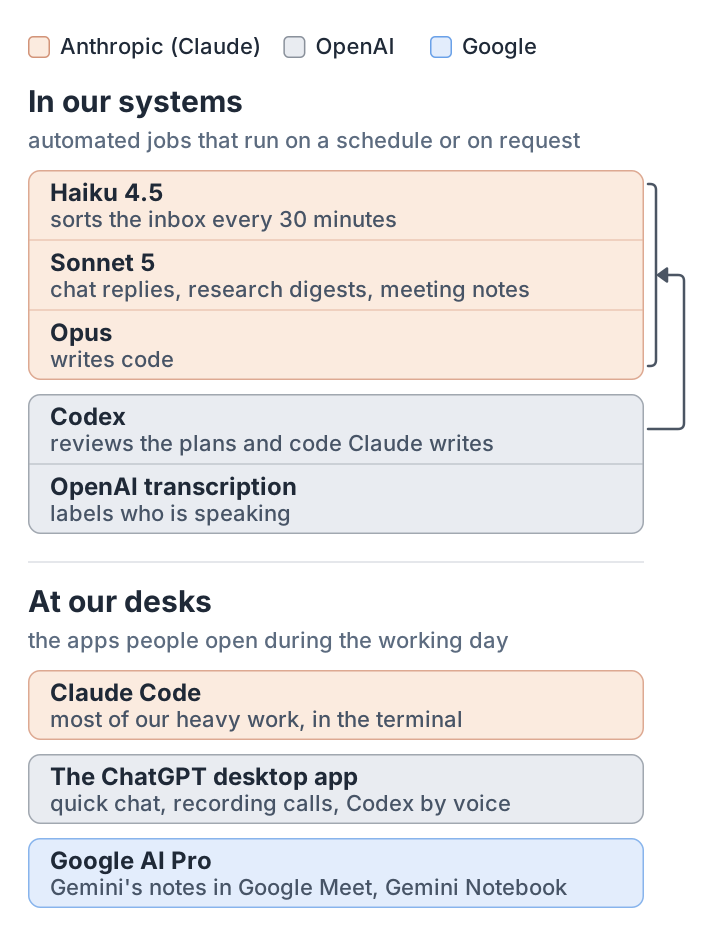
- In our systems: automated jobs that run on a schedule or on request, such as sorting the inbox, drafting, research and writing code. They call the vendors' models directly.
- At our desks: the apps people open during the working day.
In Our Systems: Claude, With One Model Per Job
Every automated job names the model it runs on:
- Haiku 4.5, the smallest model, sorts the inbox every 30 minutes.
- Sonnet 5, the mid model, writes: chat replies, research digests, meeting notes.
- Opus, the most capable model we run, writes code. We pay for Opus there because code quality outweighs the saving.
Once, a routine login change moved our jobs onto the most expensive model without anyone noticing, and they used up our usage allowance. Since then, no job inherits a default.
Matching the model to the job is also where the savings are. At API rates, inbox sorting cost about $0.21 a run on Sonnet 4.6, the mid model we used then, and about $0.75 on the 2 days that login change left it on Opus. On Haiku, where it has run since 16 June, it costs about $0.09. It does not work everywhere: the smallest model loses track of who said what across a long call transcript. For about 1.5 cents more per meeting, the mid model was better at getting people's names right, so meeting notes stay on the mid model.
2 OpenAI models do specialist jobs inside the same systems:
- Transcription: OpenAI's transcription model labels who is speaking, at about $0.36 a recording. It occasionally invents words over silence and mishears names, so a Claude pass corrects the names afterwards.
- A second reviewer: OpenAI's Codex reviews the plans and code Claude writes. Our rule is that the writer never approves its own work. The reviewer has sent back a plan it scored 3 out of 10 (the plan shipped later at 8), and it caught an arithmetic error in a financial model we were building for a client.
At Our Desks: The Apps We Open
- The ChatGPT desktop app: the quick-chat pop-up, recording and transcribing calls as they happen (Mac only), and Codex, an extra agent we talk to by voice while we work on the laptop. Its voice mode works well for conversational work.
- Claude: most of our heavy work happens in the terminal with Claude Code rather than in the Claude app.
- Google AI Pro: mainly for Gemini's notes in Google Meet, and Gemini Notebook when we need it. As more of our work moved to the terminal, we have needed it less.
Having both Claude and OpenAI means that when one hits its usage limit, we switch to the other by hand. We avoid switching tools in the middle of a task. We write a short handover note and start a fresh session with it, so each session starts with clean context.
Claude vs ChatGPT vs Gemini: What Each Is Good At For A Business
As of September 2026:
- Claude: connects to your other tools through connectors (MCP, an open standard for plugging apps into an assistant), and every paid plan includes Claude Code. It creates documents and slides, and its multi-step task mode is moving into the main app, starting with Pro and Max.
- ChatGPT: ChatGPT Work runs multi-hour jobs that produce documents, spreadsheets and simple web apps. Codex handles code, and deep research and workspace agents cover the rest.
- Gemini: built into Gmail, Docs, Sheets and Meet for Google Workspace customers; Deep Research; Gemini Notebook. If your company already runs on Workspace, Gemini is in the tools your team opens every day, which is the strongest reason to start there.
What It Costs
| One person, a month | Heavy use, a month | Per team seat, a month | |
|---|---|---|---|
| Claude | Pro, $20 | Max, $100 (5x Pro's usage) or $200 (20x) | Team Standard, $20 to $25; Premium, $100 to $125 |
| ChatGPT | Plus, $20 (£20 in the UK) | Pro, $100, $200 or $500 (from £89 in the UK) | Business, $20 to $25 (£15 to £18 in the UK) |
| AI Pro, $19.99 (£18.99 in the UK) | AI Ultra, $99.99 or £79.99 (5x); $199.99 or £189.99 (20x) | Workspace Business Standard, with Gemini: $16.80 or £14 monthly; $14 or £11.80 annual |
Sources: Claude pricing and Max plan; OpenAI business pricing, ChatGPT pricing and Pro tiers; Google AI plans and Workspace pricing. ChatGPT Pro 200 is open to new sign-ups again, mostly with a lower usage allowance than before.
Anthropic's quoted prices do not include applicable tax, and in the UK Google quotes Workspace seats before VAT. Anthropic prices in US dollars, so a UK bill in pounds depends on VAT and the exchange rate. OpenAI and Google publish UK prices, and an annual Workspace commitment costs about 16% less than monthly billing. If you build on the models directly, the mid-tier models from Anthropic (Sonnet 5.5) and OpenAI (GPT-6.1 Sol) both cost $2 per million tokens in and $10 out at standard rates; OpenAI charges more for very long prompts. Google's Gemini 3.8 Flash is $0.75 and $3.75 until 31 December 2026, then $1.50 and $7.50.
At our desks, we pay for Claude Max at 20x ($200 a month) and, since September, ChatGPT Pro at $100. We moved up because long coding-agent sessions on our own products and internal tools kept hitting the weekly usage limits. Google stays on AI Pro, which covers our meeting notes.
Your Data: 2 Things To Check
1. Personal accounts may train on your data. Business plans at all three companies do not train on your data by default. A staff member on a personal ChatGPT Plus account is under consumer terms: OpenAI may use their content to train its models unless they switch off "Improve the model for everyone". If client data goes near an AI tool, it should be on a business plan.
2. Where your data is processed. If you need data kept in a particular country or region, the options differ by vendor:
- OpenAI: as of September 2026, ChatGPT Enterprise and Edu, and approved API customers, can keep data in the UK (OpenAI help). ChatGPT Business is rolling out a choice of where stored content is kept, not yet to every customer, and OpenAI's article names no regions. The choice does not cover where requests are processed, and safety and abuse-monitoring data stays in the US (OpenAI help).
- Anthropic: Claude's API processes in the US or globally (Anthropic docs), with EU options through Amazon Bedrock or Google Cloud.
- Google: Workspace offers US or Europe data regions on Business Standard and above.
What Broke, And What We Changed
- Unpinned models drift. A default can change under you. We name the model for every job.
- Upgrades change behaviour. After one model upgrade, jobs that were meant to use no tools reached for connected tools anyway and returned nothing. A one-line setting fixed it; the lesson is to check your jobs' output after any model change.
- One model marking its own homework misses things. A second model from a different vendor reviews anything that matters.
- Long sessions degrade. We hand over to a fresh session with a written note instead of pushing one conversation further.
How We Choose
On independent scoring, Claude Opus 5.5 leads Artificial Analysis's Intelligence Index at 58 (Source: Artificial Analysis (artificialanalysis.ai), September 2026).
Output quality comes first. After that, we want the least context and tokens spent getting there, and as little wrestling with the model as possible. When a session is not producing what we need, we do not argue with it: we start again. For us, frontier models are worth what they cost, because the pace and quality of our work depend on them.
In practice:
- If your company runs on Google Workspace, start with Gemini inside it.
- If you are automating work or writing code, Claude is where we build.
- If you want a voice assistant or quick call transcription at your desk, the ChatGPT desktop app, with Codex inside it, is the one we use.
- Whatever you choose, put client data on a business plan, not personal accounts.
When A Chat App Is Not Enough
Most teams start in the chat apps and build from there. The point to bring someone in is usually when what you built stops being accurate, reliable or safe. That is the work we do for clients: see our data and AI services.